
Fix a wrong cash figure
Typed the wrong count, the wrong starting cash or the wrong amount taken out? Correct it on the day. The old figure stays on record next to the new one, so nothing is quietly changed.
On this page
What you can fix here
Correct a mistake fixes the figures of a register day:
Opening cash: what was in the drawer at the start
Closing count: what was counted at the end
Cash in/out: money paid out, moved to the safe or put in. You can also say it never happened.
For mobile money and bank accounts, their starting and closing balances and money in or out
A wrong sale is different: take it back or refund it, so the stock is right too.
Correct it
Open More, tap Money, and tap the day with the mistake. Tap Correct a mistake at the bottom of the day.
Opening the day Under What is wrong?, tap the figure that's wrong. Each one shows what was recorded.
Type the Right amount. Bizic shows the change as you type.
Under What went wrong?, say what happened, like "typed 20,000 instead of 2,000". Your manager and the owner will read it.
Tap Correct it (owner) or Send for approval (everyone else).
Correcting the closing count 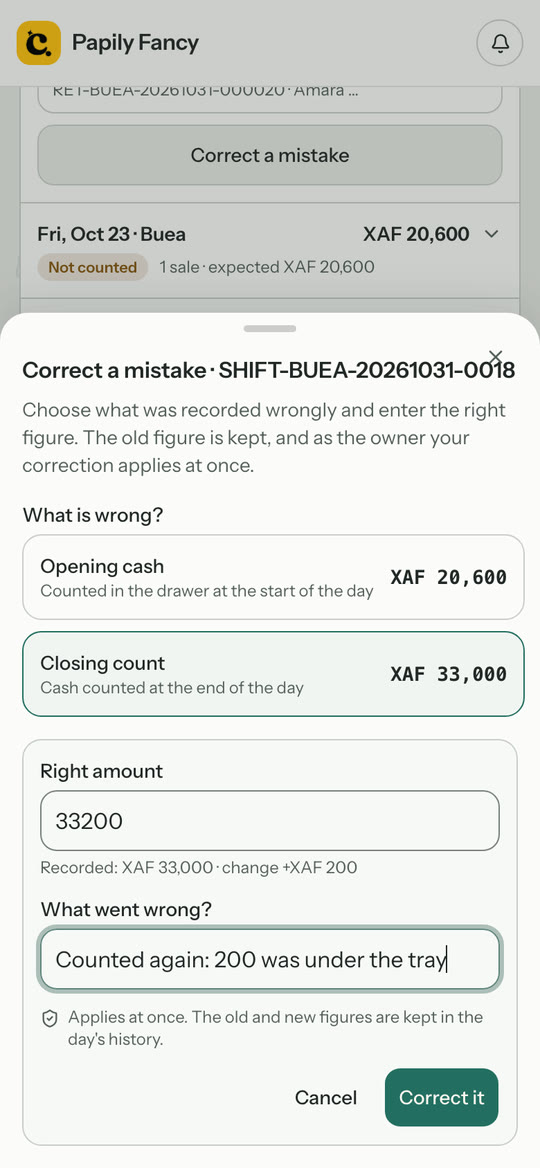
The correction, ready to send
Who approves it
The owner: the correction applies at once.
Anyone else: nothing changes until a manager for that shop approves it. You can Withdraw it while it waits. Managers see waiting corrections at the top of Money and in Approvals.
A manager's new count that matches what should be in the drawer applies at once, because there's nothing to question.
Last change, 1 November 2026: First version, with a closing count being corrected.
Still stuck?
Tell us what you were trying to do. A real person reads every message.