
What each role can see and do
Each person gets a role, and the role decides what they see. A cashier sells; a stock keeper counts; only the owner sees everything.
On this page
The roles
You pick a role when you invite someone. Each one comes with a short line saying what it's for.
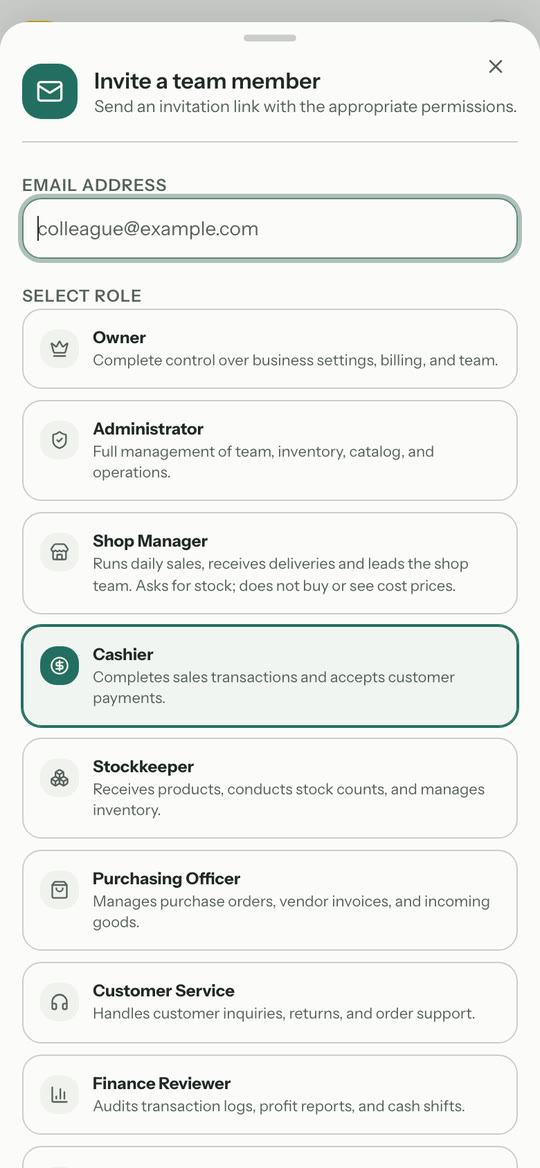
Owner: everything, including settings, billing and the team. Usually just you.
Administrator: runs the business with you: team, products, stock and the day-to-day.
Shop Manager: runs a shop's daily sales, receives deliveries and leads the shop's team. Asks the owner for stock, but doesn't buy it and doesn't see what you paid for products.
Cashier: sells and takes payment at the till, and counts the drawer.
Stockkeeper: receives products, counts stock and looks after it.
Purchasing Officer: orders from suppliers and checks deliveries and their bills.
Customer Service: answers customers, handles returns and follows orders.
Finance Reviewer: checks the money: sales, profit, the daily drawer counts.
Read-only Analyst: sees reports and dashboards, and changes nothing.
Marketing Contributor: sees what sells, to plan promotions and posts.
Good to know
People who work in one shop only see that shop: its sales, its stock and its drawer.
One person can have more than one role, like Cashier and Stockkeeper. Add the second one under Manage access on Team.
Some actions always need a manager or the owner, even for a cashier: big discounts, corrections to the drawer, and stock counts that don't match. They ask, and it lands in Approvals.
Last change, 1 November 2026: First version, the roles in plain words.
Still stuck?
Tell us what you were trying to do. A real person reads every message.