
Count the drawer and close the day
At closing time, count the cash, type it in, and Bizic tells you straight away if the drawer is over or short. One count a day keeps your money honest.
Count the cash
Open More, tap Sell, then tap Close the day.
Bizic shows what Should be in the drawer: the opening cash, plus cash sales, and any refunds or money in and out (only the lines with something in them).
Count every note and coin in the drawer, and type the total in Cash counted now. Bizic shows straight away if it Matches, or is Short or Over, and by how much.
Opening the count and typing what's in the drawer
If it's short or over
Bizic asks Where did the XAF … go?, or Where did the extra XAF … come from? if there's more. Type it in a few words, like "transport", "owner took it" or "put in MoMo".
It's recorded in Money in and out, so the drawer then matches. Money put into your mobile money, or taken out of it into the drawer, is recorded as a move, not spending. Type not sure if nobody knows: the difference stays as short or over, for the owner to see.
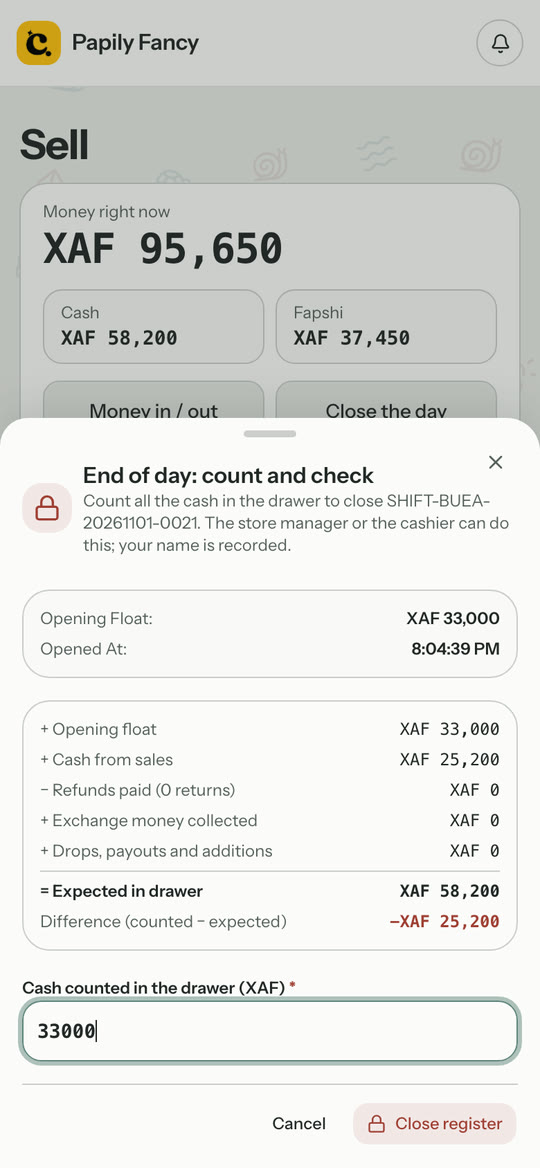
Expected XAF 58,200, but XAF 33,000 counted: XAF 25,200 short, in red
Close the register
Tap Close register. The day is closed, and your count is saved with your name.
Closing the register
Tomorrow, the till starts from tonight's count. If the drawer has a different amount, it asks the same question before it opens. Not sure in the morning goes to a manager to approve (an owner's is recorded straight away).
Last change, 21 November 2026: Short or over? Say where the money went in a few words, and it's recorded in Money in and out.
Still stuck?
Tell us what you were trying to do. A real person reads every message.